
Kyocera ECOSYS M2040dn error C6610: fuser press-release sensor error
Applies to: Kyocera ECOSYS M2040dn, Kyocera ECOSYS M2135dn, Kyocera ECOSYS M2635dn, Kyocera ECOSYS M2635dw, Kyocera ECOSYS M2735dw, Kyocera ECOSYS M2540dn, Kyocera ECOSYS M2540dw, Kyocera ECOSYS M2640idw
Quick answer
Kyocera ECOSYS M2040dn error C6610 means the fuser press-release sensor did not switch within 10 seconds when the printer raised or lowered the fuser pressure. The first thing to check is paper stuck in the fuser. Clear any visible paper, then call a technician if the code returns.
What does C6610 mean?
A motor raises and lowers the pressure in the fuser, and the press-release sensor reports which state it is in. C6610 appears if the sensor has not turned on 10 seconds after pressure increase starts, or has not turned off 10 seconds after pressure decrease starts. The same code and the same checks apply to the ECOSYS M2135dn, M2635dn, M2635dw, M2735dw, M2540dn, M2540dw and M2640idw, because Kyocera covers all of them in one service manual.
What causes C6610?
Paper left inside the fuser
A stuck piece of paper stops the pressure release from working properly.
Pressure release not working
The fuser press-release mechanism does not move as it should.
Sensor badly fitted
The fuser pressure release sensor is not mounted correctly, so its actuator does not block it.
Loose connector or damaged wire
The lead from the fuser unit (pressure release sensor) to the main/engine PWB (YC19), or from the fuser pressure release motor to the main/engine PWB (YC1), is not making good contact.
Pressure release motor fault
The fuser pressure release motor does not run properly.
Fault inside the fuser unit
Parts inside the fuser unit, such as the press-release sensor, have failed.
Main/engine PWB fault
The main control board is faulty. The manual lists this last.
What can you check yourself?
- 1
Switch off and unplug
Turn the power switch off and remove the plug from the wall socket before opening any cover.
- 2
Clear stuck paper
Open the covers you normally use for paper jams and remove any paper you can see near the fuser. Do not touch hot metal parts and do not unscrew anything.
- 3
Try once more
Close the covers, plug in and switch on. If C6610 comes back, leave the printer off and call a technician.
Steps for a technician
- 1
Clear paper from the fuser
Remove any paper left in the fuser unit.
- 2
Check the pressure release
Turn the fuser gear backwards by hand and see whether the fuser pressure drops. If it does not, fit a new fuser unit.
- 3
Refit the press-release sensor
With the pressure lowered, check that the actuator blocks the fuser pressure release sensor. If it does not, refit the sensor.
- 4
Check the connections
Clean the contacts and refit the connectors for fuser unit (pressure release sensor) to main/engine PWB (YC19) and fuser pressure release motor to main/engine PWB (YC1). Fit a new wire if there is no continuity.
- 5
Replace the pressure release motor
If the code stays, fit a new fuser pressure release motor.
- 6
Replace the fuser unit
If the code still stays, parts inside the fuser unit are faulty. Fit a new fuser unit.
- 7
Replace the main/engine PWB
As the final step, fit a new main/engine PWB.
Parts for this error
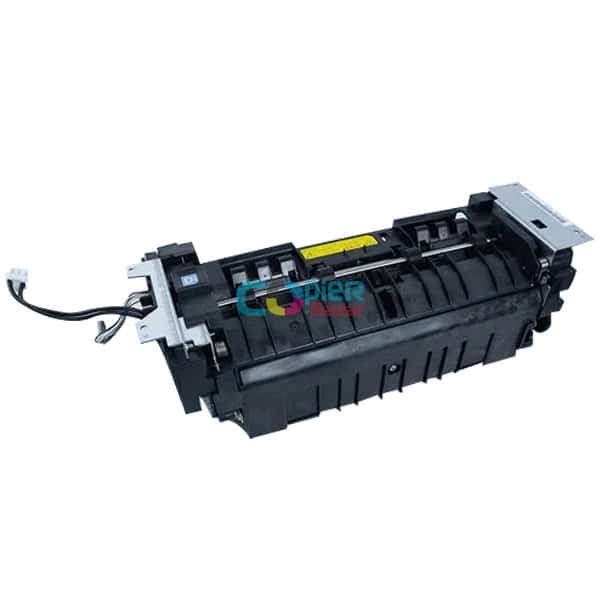
Fuser unit
Only if the step 2 check shows the fuser pressure does not drop, or if steps 3 to 5 do not clear C6610 and the manual reaches step 6.
When should you call a technician?
Call a technician if C6610 returns after you have removed any visible paper. The remaining checks need the fuser unit, its sensor and motor reached.
Questions people ask
- What does error C6610 mean on a Kyocera M2040dn?
- On a Kyocera ECOSYS M2040dn, C6610 is a fuser press-release sensor error. The sensor did not change state within 10 seconds when the printer raised or lowered the fuser pressure.
- How do I clear Kyocera C6610?
- Switch off, unplug and remove any paper you can see near the fuser. If C6610 returns, a technician checks the pressure release action, the sensor, the wiring and the pressure release motor.
- Does Kyocera C6610 need a new fuser unit?
- Not always. The Kyocera manual fits a new fuser unit only if the pressure does not drop when the fuser gear is turned back by hand, or after the sensor, wiring and motor checks fail.
- Is C6610 the same as C6600 on a Kyocera M2040dn?
- No. C6600 is a fuser rotation error, while C6610 comes from the sensor that reports the fuser pressure state.