
Kyocera ECOSYS M2040dn J4211, J4212, J4213, J4218, J4219: exit sensor stay jam
Applies to: Kyocera ECOSYS M2040dn, Kyocera ECOSYS M2135dn, Kyocera ECOSYS M2635dn, Kyocera ECOSYS M2635dw, Kyocera ECOSYS M2735dw, Kyocera ECOSYS M2540dn, Kyocera ECOSYS M2540dw, Kyocera ECOSYS M2640idw
Codes covered on this page: J4211, J4212, J4213, J4218, J4219
Quick answer
Kyocera ECOSYS M2040dn codes J4211, J4212, J4213, J4218 and J4219 are exit sensor stay jams: the sheet reached the exit area but did not leave in time. An object on the output tray or curled paper are common causes. First clear the sheet, empty the output tray, fold away the paper stopper and print again.
What does J4211 mean?
The exit sensor turned on but did not turn off in time, so paper is stuck between the fuser and the output tray. The manual covers all five together for paper fed from cassettes 1 to 3, the duplex section or the MP tray; following the numbering of the other jam codes, the last digit (1, 2, 3, 8, 9) matches that paper source. The manual separates three cases: a jam in the fuser section before the upper exit roller, a jam in the exit unit, and a jam at the FD guide in the eject and feedshift section, the stretch that carries paper from the fuser to the inner tray or into the duplex path. The same code and steps apply to the ECOSYS M2135dn, M2635dn, M2635dw, M2735dw, M2540dn, M2540dw and M2640idw, which share one Kyocera service manual.
What causes J4211?
Fuser section
Curled paper, scraps, burrs or melted toner on the exit guide, a loose exit sensor actuator, loose exit sensor (YC19) or main motor (YC9) wiring, a lower exit roller drive problem, a faulty exit sensor, main motor or main/engine PWB.
Exit unit
An object on the output tray, the paper stopper left out, guides not set, toner on the exit guide, a worn upper exit roller or pulley, a deformed drive gear, faulty torque limiter or worn bushing, a fuser unit or exit unit not seated, or the exit sensor and its actuator.
FD guide
Unsupported, bent or wavy paper, melted toner or burrs on the FD guide, curled or damp paper, wrong media settings, an FD guide not fitted, loose exit solenoid wiring (YC1), a faulty exit solenoid or main/engine PWB.
What can you check yourself?
- 1
Switch off before reaching inside
Turn the power switch off before you put your hands inside a cover or the cassette slot.
- 2
Clear the sheet
Open the rear cover and remove the sheet gently. Let the fuser area cool first.
- 3
Clear the output tray
Remove anything lying on the output tray and fold away the paper stopper if it is pulled out.
- 4
Match the paper settings
In the system menu, make sure the paper size and media type set for that tray match the paper actually loaded.
- 5
Use paper within specification
Damp, wavy, curled or out-of-specification paper is a common cause. Use fresh, dry paper of a supported type and keep spare paper in a dry place.
- 6
Try again
Close all covers, switch on and print a few pages. If the same code keeps coming back, stop and call a technician.
Steps for a technician
- 1
Fuser section: check paper and exit guide
Use long grain paper if sheets curl. Remove scraps, foreign objects or burrs from the exit guide and actuator, replacing the guide if needed. Clean melted toner off the exit guide.
- 2
Fuser section: check actuator and wiring
Refit the exit sensor actuator. Reseat exit sensor (YC19) and main motor (YC9) on the main/engine PWB.
- 3
Fuser section: check the lower exit roller drive
Seat the fuser unit so the main motor drive reaches the lower exit roller. If the drive gear is damaged or the bushing is worn, replace the fuser unit.
- 4
Fuser section: check sensor, motor and board
Clean and refit the exit sensor or replace the fuser unit that includes it. Refit or replace the main motor. Replace the main/engine PWB.
- 5
Exit unit: check tray and guides
Remove obstacles from the tray, fold away the stopper, set the width guides, and clean and refit the exit guide. Remove burrs or replace the exit unit.
- 6
Exit unit: check the upper exit roller and drive
Clean the upper exit roller and pulley and replace them if worn. If the drive gear is deformed, the torque limiter is faulty or the bushing is worn, replace the exit unit.
- 7
Exit unit: refit units and check wiring
If the sensor does not turn on with paper, reseat both the fuser unit and the exit unit, then plug the exit unit connector back in. Reseat main motor (YC9) and exit sensor (YC19), refit or replace the main motor, and correct the exit sensor actuator and spring or replace the fuser unit. Check the exit sensor, then the main/engine PWB.
- 8
FD guide: check paper and settings
Use supported paper, remove bent sheets and sheets with foreign matter, correct wavy paper, use long grain paper if it curls, replace damp paper and set the correct media type.
- 9
FD guide: check the guide and solenoid
Clean melted toner off the FD guide, remove scraps or burrs or replace it, and refit the FD guide and the exit unit connector. Reseat exit solenoid to main/engine PWB (YC1), refit or replace the exit solenoid, and replace the main/engine PWB last.
Parts for this error
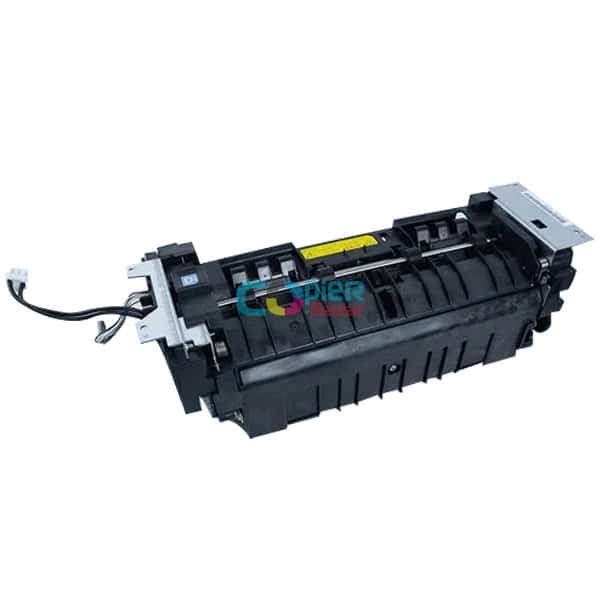
Fuser unit
Only if step 3, 4 or 7 ends in a fuser unit replacement. The exit sensor and lower exit roller drive are handled in the manual by fitting a complete fuser unit.
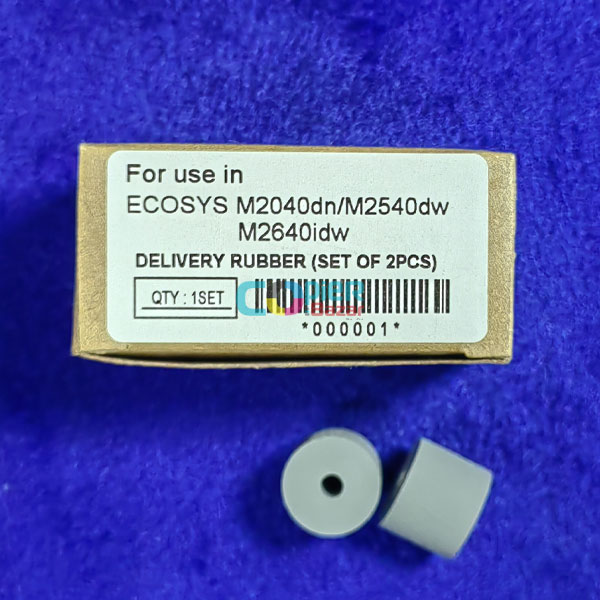
Delivery rubber (set of 2)
Only if step 6 finds the upper exit roller worn after cleaning. The store calls this delivery rubber and does not say which roller it fits, so your technician should confirm it matches the upper exit roller before ordering.
When should you call a technician?
Call a technician if the exit jam returns with a clear output tray and good paper, or if paper keeps hitting the FD guide.
Questions people ask
- What does J4211 mean on a Kyocera M2040dn?
- J4211 on a Kyocera ECOSYS M2040dn is an exit sensor stay jam: paper reached the exit sensor but did not leave it in time. J4212, J4213, J4218 and J4219 are the same jam for other paper sources.
- Can a full output tray cause a Kyocera exit jam?
- Yes. The Kyocera manual first checks for an obstacle on the output tray and a paper stopper that has been left out.
- What is the FD guide in a Kyocera M2040dn?
- It is a guide in the eject and feedshift section, between the fuser and the inner tray or duplex path. For J4211 jams there, the manual checks melted toner and burrs on the FD guide, its fitting, and the exit solenoid.
- Does J4211 need a new exit roller?
- Only if cleaning does not help. The manual says to clean the upper exit roller and pulley first and replace them if worn; drive gear, torque limiter or bushing faults mean a new exit unit.