
Kyocera ECOSYS M2040dn J0000: power on jam
Applies to: Kyocera ECOSYS M2040dn, Kyocera ECOSYS M2135dn, Kyocera ECOSYS M2635dn, Kyocera ECOSYS M2635dw, Kyocera ECOSYS M2735dw, Kyocera ECOSYS M2540dn, Kyocera ECOSYS M2540dw, Kyocera ECOSYS M2640idw
Quick answer
Kyocera ECOSYS M2040dn code J0000 is a power on jam. When the printer was switched on, one of its paper sensors was already reporting paper. The usual cause is a sheet or scrap left inside. Switch off, open the covers, remove any paper you can see and switch on again.
What does J0000 mean?
At switch-on the printer expects every paper sensor in the path to be clear. J0000 means one of them was already on, so the printer assumes paper is stuck. The manual's checks point to the registration sensor and the exit sensor. The same code and steps apply to the ECOSYS M2135dn, M2635dn, M2635dw, M2735dw, M2540dn, M2540dw and M2640idw, which share one Kyocera service manual.
What causes J0000?
Paper or debris in the path
A scrap of paper, foreign object or burr on a guide or sensor actuator keeps a sensor switched on.
Dirty sensor
Dust on the registration sensor or exit sensor can make it read paper that is not there.
Sensor connector loose
The registration sensor or exit sensor is not properly connected.
Faulty sensor
The registration sensor sits on the high voltage PWB and the exit sensor is part of the fuser unit, so a failed sensor means replacing that assembly.
What can you check yourself?
- 1
Switch off before reaching inside
Turn the power switch off before you put your hands inside a cover or the cassette slot.
- 2
Remove leftover paper
Pull out the cassette and open the front and rear covers. Remove any paper or torn scraps you can see. Let the fuser area cool before reaching near it.
- 3
Try again
Close all covers, switch on and print a few pages. If the same code keeps coming back, stop and call a technician.
Steps for a technician
- 1
Clear the paper path
Remove paper scraps, foreign objects or burrs from guides and actuators along the path.
- 2
Clean the sensors
Clean the registration sensor and the exit sensor.
- 3
Reconnect the sensors
Refit the connectors of the registration sensor and the exit sensor.
- 4
Replace the faulty sensor assembly
If the registration sensor is at fault, replace the high voltage PWB that carries it. If the exit sensor is at fault, replace the fuser unit that contains it.
Parts for this error
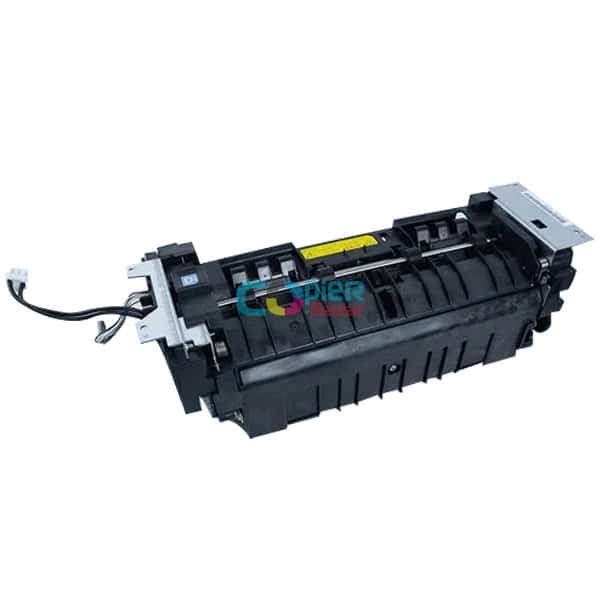
Fuser unit (includes the exit sensor)
Only if step 4 shows the exit sensor is faulty. The exit sensor is built into the fuser unit, so the manual's measure is a complete fuser unit.
When should you call a technician?
Call a technician if J0000 shows again after you have removed all visible paper and switched on again.
Questions people ask
- What is J0000 on a Kyocera M2040dn?
- J0000 is a power on jam. A paper sensor was already on when the Kyocera ECOSYS M2040dn was switched on, so it assumes paper is stuck inside.
- How do I clear Kyocera J0000?
- Switch off, open the cassette, front and rear covers and remove any paper or scraps you can see. Switch on again. If it returns, a technician cleans and checks the registration and exit sensors.
- Which sensor causes J0000?
- The Kyocera manual checks the registration sensor, which is on the high voltage PWB, and the exit sensor, which is part of the fuser unit.