
Kyocera ECOSYS M2040dn J9000: no original feed from the document processor
Applies to: Kyocera ECOSYS M2040dn, Kyocera ECOSYS M2135dn, Kyocera ECOSYS M2635dn, Kyocera ECOSYS M2635dw, Kyocera ECOSYS M2735dw, Kyocera ECOSYS M2540dn, Kyocera ECOSYS M2540dw, Kyocera ECOSYS M2640idw
Quick answer
Kyocera ECOSYS M2040dn code J9000 means the document processor, the automatic document feeder, did not feed an original even after trying again. Folded, curled or out-of-spec originals and a worn DP feed roller are likely causes. First remove the originals, flatten them, take out any with folded edges and reload them.
What does J9000 mean?
When you scan or copy from the document processor (DP), it pulls the top original in and expects the DP feed sensor to turn on. J9000 means that did not happen even after a second try. The manual checks the originals and path first, then the DP feed roller, the sensor actuator, wiring, drive, sensor, clutch, motor and main/engine PWB. The same code and steps apply to the ECOSYS M2135dn, M2635dn, M2635dw, M2735dw, M2540dn, M2540dw and M2640idw, which share one Kyocera service manual.
What causes J9000?
Original problems
Folded leading edge, downward curl or waves, unsupported originals, or originals with foreign matter.
Scraps in the document path
A piece of paper, foreign object or burr on a guide or actuator.
DP feed roller worn or dirty
The DP feed roller does not grip the original.
DP feed sensor actuator
A bent actuator or spring stops the DP feed sensor working.
Wiring
Loose DP feed sensor (YC34), DP feed clutch (YC33) or DP feed motor (YC33) connectors on the main/engine PWB.
Drive, sensor, clutch, motor or board
DP feed motor drive not reaching the roller, or a faulty DP feed sensor, DP feed clutch, DP feed motor or main/engine PWB.
What can you check yourself?
- 1
Clear the document processor
Lift the document processor cover and remove the original and any scraps of paper you can see. Close the cover firmly.
- 2
Check the originals
Remove originals with folded edges, staples, clips, tape or other matter stuck to them. Flatten curled or wavy originals, or turn them end to end and reload. Use originals within the document processor's specification.
- 3
Set the original guides
Slide the document processor's original width guides so they touch the sides of the stack.
- 4
Try again
Reload a small stack and scan again. If J9000 returns, use the platen glass for now and call a technician.
Steps for a technician
- 1
Check the originals
Remove folded originals and originals with foreign matter, correct or replace curled or wavy originals (switch top and bottom, or turn them over for duplex scanning), and ask users to keep to supported originals.
- 2
Clear the document path
Remove scraps of paper, foreign objects or burrs from the guides and actuators along the document path.
- 3
Check the DP feed roller
Clean its surface and replace it if worn.
- 4
Check the DP feed sensor actuator
Correct and refit a bent actuator or spring, and replace it if needed.
- 5
Check wiring
Reseat DP feed sensor (YC34), DP feed clutch (YC33) and DP feed motor (YC33) on the main/engine PWB, and replace a wire with no continuity.
- 6
Check the drive
Turn the DP feed roller by hand and clean, refit or replace the drive parts.
- 7
Check sensor, clutch, motor and board
Clean, refit or replace the DP feed sensor, then refit or replace the DP feed clutch and the DP feed motor. Replace the main/engine PWB last.
Parts for this error
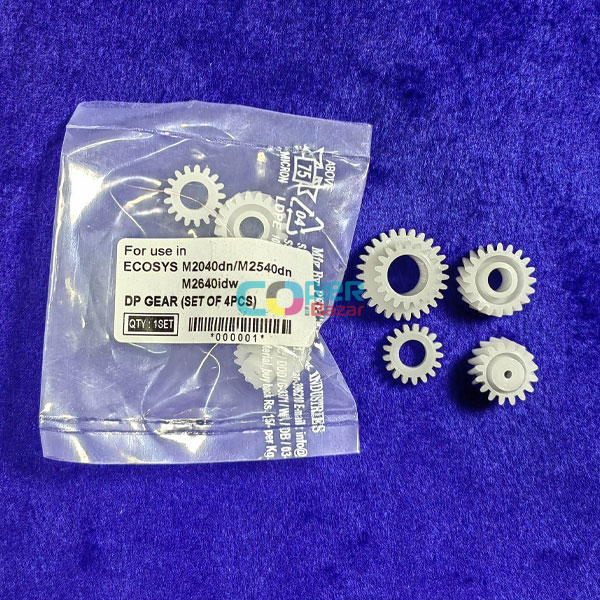
DP gears (set of 4)
Only if the drive check finds a damaged document processor drive gear. The manual just says to replace the drive parts and the store listing does not say which DP gears are in the set, so compare them with the old parts first.
When should you call a technician?
Call a technician if J9000 continues with flat, supported originals and the guides set.
Questions people ask
- What does J9000 mean on a Kyocera M2040dn?
- J9000 on a Kyocera ECOSYS M2040dn means the document processor did not feed the original, even after a second attempt.
- Why will my Kyocera document feeder not pick up paper?
- The Kyocera manual checks folded, curled or unsupported originals first, then a worn DP feed roller, the DP feed sensor actuator and the DP drive, clutch and motor.
- Can I still copy while J9000 is showing?
- Once the error is cleared you can place originals on the platen glass instead of the document processor until it is repaired.