
Kyocera ECOSYS M2040dn J9110: DP feed sensor multi-feeding jam
Applies to: Kyocera ECOSYS M2040dn, Kyocera ECOSYS M2135dn, Kyocera ECOSYS M2635dn, Kyocera ECOSYS M2635dw, Kyocera ECOSYS M2735dw, Kyocera ECOSYS M2540dn, Kyocera ECOSYS M2540dw, Kyocera ECOSYS M2640idw
Quick answer
Kyocera ECOSYS M2040dn code J9110 is a document processor multi-feeding jam: the DP feed sensor stayed on, so an original is stuck or more than one fed. Folded or curled originals and loose width guides are likely causes. First remove the originals, flatten them, set the original width guides and reload a smaller stack.
What does J9110 mean?
The DP feed sensor should turn off once an original has passed. J9110 means it did not. The manual checks the originals, then skew causes (DP feed roller, width guides, DP feed guide), the sensor actuator, wiring, drive, sensor, clutch, motor and main/engine PWB. The same code and steps apply to the ECOSYS M2135dn, M2635dn, M2635dw, M2735dw, M2540dn, M2540dw and M2640idw, which share one Kyocera service manual.
What causes J9110?
Original problems
Folded leading edge, curl or waves, unsupported originals, or foreign matter on them.
Skewed original
A worn DP feed roller, original width guides not set to the size, or an original catching on the DP feed guide.
DP feed sensor actuator
A bent actuator or spring.
Wiring
Loose DP feed sensor (YC34), DP feed clutch (YC33) or DP feed motor (YC33) connectors.
Drive, sensor, clutch, motor or board
DP feed motor drive not reaching the roller, or a faulty DP feed sensor, DP feed clutch, DP feed motor or main/engine PWB.
What can you check yourself?
- 1
Clear the document processor
Lift the document processor cover and remove the original and any scraps of paper you can see. Close the cover firmly.
- 2
Check the originals
Remove originals with folded edges, staples, clips, tape or other matter stuck to them. Flatten curled or wavy originals, or turn them end to end and reload. Use originals within the document processor's specification.
- 3
Set the original guides
Slide the document processor's original width guides so they touch the sides of the stack.
- 4
Try again
Reload a smaller stack. If J9110 returns, use the platen glass and call a technician.
Steps for a technician
- 1
Check the originals
Remove folded originals and originals with foreign matter, correct or replace curled or wavy originals (switch top and bottom, or turn them over for duplex scanning), and ask users to keep to supported originals.
- 2
If originals skew, check the DP feed roller
Clean its surface and replace it if worn.
- 3
Set the DP original width guides
Align them to the original size.
- 4
Check the DP feed guide
Refit it, remove any burr on its paper side, and replace it if needed.
- 5
Check the DP feed sensor actuator
Correct and refit a bent actuator or spring, and replace it if needed.
- 6
Check wiring
Reseat DP feed sensor (YC34), DP feed clutch (YC33) and DP feed motor (YC33) on the main/engine PWB.
- 7
Check the drive
Turn the DP feed roller by hand and clean, refit or replace the drive parts.
- 8
Check sensor, clutch, motor and board
Clean, refit or replace the DP feed sensor, refit or replace the DP feed clutch and DP feed motor, and replace the main/engine PWB last.
Parts for this error
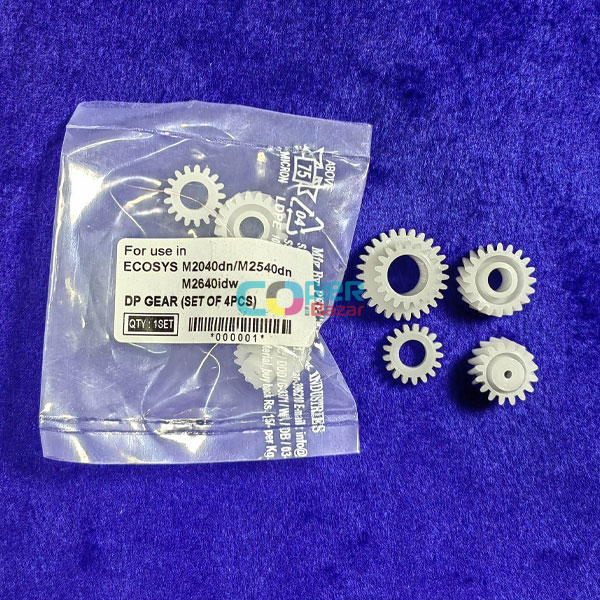
DP gears (set of 4)
Only if the drive check finds a damaged document processor drive gear. The manual just says to replace the drive parts and the store listing does not say which DP gears are in the set, so compare them with the old parts first.
When should you call a technician?
Call a technician if J9110 continues with flat originals and the width guides set.
Questions people ask
- What does J9110 mean on a Kyocera M2040dn?
- J9110 on a Kyocera ECOSYS M2040dn means the document processor's feed sensor did not turn off, which the manual calls a DP feed sensor multi-feeding jam.
- Why does my Kyocera document feeder feed skewed pages?
- For J9110 the Kyocera manual checks a worn DP feed roller, original width guides not set to the size, and originals catching on the DP feed guide.
- What is the difference between J9000 and J9110?
- J9000 means the original never reached the DP feed sensor. J9110 means the sensor saw paper but did not clear.