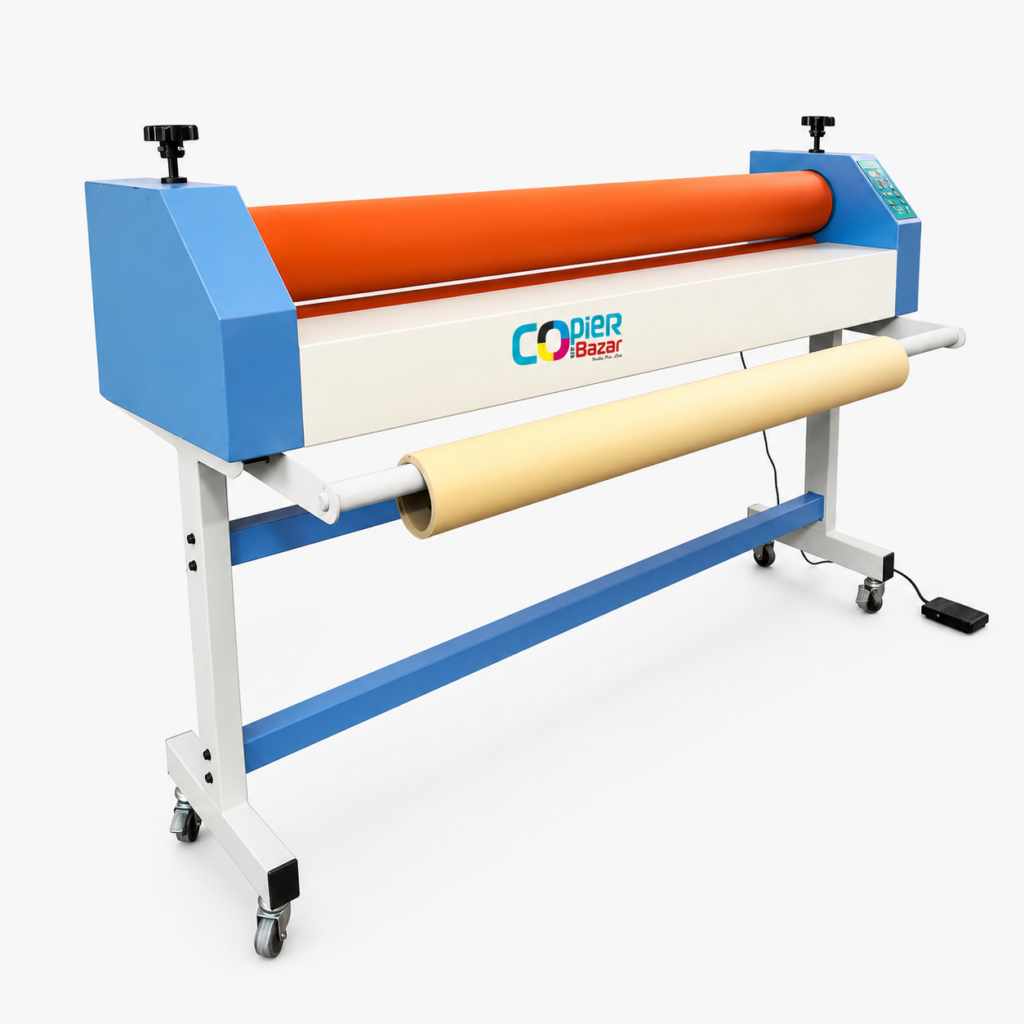
The short answer: a cold lamination machine uses roller pressure and self-adhesive film, so it is safe for inkjet prints, photos and flex, and it is the standard for wide-format work in Indian print shops. A thermal (hot) lamination machine melts glue with heat, gives a stiffer sealed finish, and suits small pouch jobs like ID cards and certificates. Most shops that print posters, photos or banners need cold; most shops that only seal documents need thermal; busy shops end up with both. This guide explains the difference in plain language, with real prices in rupees, so you can decide before spending money on the wrong machine.
What is cold lamination?
Cold lamination sticks a protective plastic film onto your print using pressure alone. The film comes coated with a pressure-sensitive adhesive and a release liner, like a giant sticker. You peel the liner, feed the print and film between two rubber rollers, and turn the crank. The rollers press the film down evenly, pushing air out as they go. No heating element, no waiting for warm-up, and on manual machines, no electricity at all.
Because nothing gets hot, the print underneath is never stressed. This matters more than most first-time buyers realise. Inkjet ink sits on top of the paper rather than soaking in, and heat can smudge or dull it. Photo paper can curl. Solvent-printed flex can ripple. Cold lamination avoids all of it, which is why flex shops, photo studios and poster printers across India run cold machines all day.
Cold lamination machines are sized by roller width. Our range at Copier Bazar runs from a 650mm (25 inch) machine at ₹7,999 up to a 1600mm (63 inch) machine with stand at ₹35,000, all manual hand-crank models. The full size-by-size comparison is on our cold lamination machine page.
What is thermal (hot) lamination?
Thermal lamination uses film coated with a heat-activated glue. The machine heats its rollers, the glue melts as the print passes through, and the film bonds to the paper as it cools. The result is a stiff, fully sealed sheet, the familiar hard finish you see on ID cards, menus and school certificates.
Thermal machines come in two main forms. Pouch laminators take pre-cut pouches, A4 or ID card size, and are what most stationery shops use for document work. Roll-fed thermal machines take film on rolls and handle continuous or larger jobs. Both need electricity, and both need a warm-up period before the first job of the day.
Cold vs thermal: the full comparison
| Cold lamination | Thermal (hot) lamination | |
|---|---|---|
| How it bonds | Pressure-sensitive adhesive film, pressed by rollers | Heat-activated glue, melted by hot rollers |
| Electricity | Not needed on manual machines | Needed, plus warm-up time |
| Safe for inkjet prints | Yes, no heat touches the ink | Risky, heat can smudge or dull inkjet output |
| Safe for photos | Yes | Can curl or bubble photo paper |
| Flex and vinyl banners | The standard method | Not suitable |
| Finish | Flexible, glossy or matte film | Stiff, fully sealed edge-to-edge |
| Best for | Posters, photos, flex, vehicle graphics, wide format | ID cards, certificates, menus, documents |
| Typical machine price | ₹7,999 to ₹35,000 by roller width (our range) | Small pouch machines cost a few thousand rupees; roll-fed thermal machines cost more |
| Running skill needed | Feeding straight and keeping tension even | Setting the right temperature for the film |
When cold lamination is the right choice
Buy a cold machine when your work looks like any of this:
- Inkjet and photo printing. Wedding albums, studio portraits, poster prints. Heat is the enemy of this output; cold film protects it without touching the ink.
- Flex and signage. Banners, in-shop branding, hoardings, vehicle graphics. This work is wide, and it is printed on media that should never be heated. A 1300mm or 1600mm cold machine is a fixture in every serious flex shop.
- Poster and art prints. College projects, maps, charts, framed prints. Cold film in matte kills glare; gloss makes colours pop.
- Anything wider than A3. Pouch machines stop at small sizes. Once your media crosses poster width, roll-fed cold lamination is the practical path.
One more point shop owners care about: a manual cold machine has almost nothing to break. There is no heater coil, no motor, no thermostat. Two rollers, a crank and a frame. That is why the running cost of a cold machine is basically just the film.
When thermal lamination is the right choice
Buy a thermal machine when your work is small-format document sealing:
- ID cards and Aadhaar-size work. The stiff sealed pouch is exactly what customers expect an ID to feel like.
- Certificates and mark sheets. Families want documents sealed hard so they survive decades in a folder.
- Menus and price lists. Wipe-clean, spill-proof, stiff enough to hand across a counter every day.
A laser-printed document takes heat well, which is why thermal pouches and office documents get along. The trouble starts when shops push photos or inkjet prints through a hot machine because it is the only laminator they own. That brings us to the mistakes.
The mistakes that ruin prints
We sell machines across India and the same three stories come back again and again:
- Hot-laminating an inkjet print. The print goes in bright and comes out dull, sometimes with the ink visibly bled. The customer sees it instantly. Inkjet output belongs in a cold machine.
- Buying a machine narrower than the media. A shop with a 24 inch laminator and 36 inch posters ends up cutting every job or turning it away. Measure the widest media you print, then buy at or above that width. It is cheaper than buying twice.
- Rushing the feed. Wrinkles and trapped air come from feeding crooked or cranking unevenly, not from the machine. The fix is technique: line the print up square, keep the film tension steady, and turn at one speed. Ten minutes of practice on waste prints saves a lot of film.
What do lamination machines cost in India?
For cold machines, price follows roller width. Our current range:
| Cold lamination machine | Width | Price | Typical buyer |
|---|---|---|---|
| 650mm manual | 25 inch | ₹7,999 | Photo studios, document shops |
| 750mm manual | 29.5 inch | ₹8,999 | Poster printers |
| 1000mm manual | 39 inch | ₹15,000 | Mixed poster and banner shops |
| 1300mm with stand | 51 inch | ₹28,000 | Flex and signage shops |
| 1600mm with stand | 63 inch | ₹35,000 | Full-width flex and hoardings |
All five are manual hand-crank machines, ship free anywhere in India, and come with a GST invoice. Prices above are our live store prices at the time of writing; the category page always shows the current rate.
Small thermal pouch laminators are a different budget class altogether, usually a few thousand rupees from office-supply sellers, and they make sense as an add-on for ID and certificate work rather than as a replacement for a cold machine.
What about “hot and cold” combo machines?
You will see machines advertised as hot and cold in one body. They exist mostly in the small pouch format: the heater handles thermal pouches, and a cold setting lets adhesive pouches pass through without heat. For document-size work that flexibility is handy. For wide-format work it does not replace a roll-fed cold machine, because the pouch format caps the size. If your jobs are wider than A3, plan around a proper cold roll machine and treat a pouch laminator as the side tool.
Using a cold lamination machine, step by step
If you have never run one, here is the whole job. First, load the film roll onto the top shaft and thread its leading edge between the rollers, adhesive side facing down. Second, peel back a hand-width of release liner and fold it under, so the sticky face is exposed right where the rollers meet. Third, place your print face-up on the feed tray and line its edge up square with the rollers. Fourth, turn the crank slowly with one hand while your other hand keeps light, even tension on the print so it cannot drift sideways. The rollers pull the print and film together and press out the air as one moving line. Finally, keep cranking until the print is fully through, then cut the film behind it and trim the edges with a blade and ruler.
The first two or three attempts usually have a wrinkle or an air line somewhere, and that is normal. Practice on waste prints, not customer jobs. By the second day the motion becomes automatic, and an experienced operator laminates a full-size poster in under a minute of actual cranking.
Keeping the machine healthy
A manual cold laminator asks for very little, but the little matters. Keep the rollers clean: dust and adhesive residue on the rubber print themselves into every job as tiny bumps, so wipe the rollers with a dry or lightly damp cloth at the end of the day, never with solvents that attack rubber. Never cut film on the roller; run the print past, then cut in the open gap behind it, because a blade nick in the rubber shows up in every job afterwards. Release the roller pressure when the machine sits idle overnight, so the rubber does not develop a flat line where the rollers touch. And keep the machine covered; a simple cloth cover is the difference between clean rollers and a Monday morning spent picking dust specks out of laminated prints.
A word on film
Film is the recurring cost, so buy it thoughtfully. Match the roll width to your machine, or a little narrower for the jobs you actually run; running 63 inch film on 25 inch jobs wastes more than half of every metre. Thicker films feel more premium and add stiffness, thinner films drape better on flex that needs to stay rollable. Store rolls upright or hung on a rod, in their bags, away from sunlight; heat and dust shorten the life of the adhesive, and a roll that sat unwrapped in a hot shop for months will show it in the finish. When quoting a job, count the film by the print length plus trim margin on all sides, then add your wastage honestly. Shops that track this for a month usually discover film wastage is where their lamination margin quietly leaks.
Gloss or matte film?
Both work in the same cold machine, so this is a stocking decision, not a machine decision. Gloss deepens colour and suits photos, posters and most flex work. Matte removes reflections, which framed prints, maps and anything displayed under tube lights benefit from. Shops usually keep one roll of each and let the customer choose; matte often carries a small premium because customers see it as the finer finish.
How to choose in two minutes
Answer three questions and the machine picks itself:
- What do you print? Inkjet, photos or flex mean cold. Laser documents and ID work mean thermal. Both kinds of work mean you will eventually own both machines.
- How wide is your widest job? Buy at or above that width. 25 inch covers photo and document shops, 39 inch covers poster work, 51 to 63 inch covers flex.
- Where will it run? No stable power, or a counter that moves between shop and exhibition stalls? A manual cold machine runs anywhere.
Common questions
Can I laminate photos in a hot machine if I am careful?
Some photos survive it, enough to tempt shops into trying. But curling and bubbling show up often enough that no shop doing regular photo work relies on heat. Cold film gives the same protection with none of the risk, so there is no reason to gamble with a customer’s only copy of a photograph.
Does cold lamination peel off later?
Good film applied with even pressure stays put for years. Peeling comes from dusty prints, damp paper or feeding so fast that air stays trapped. Clean, dry prints and a steady crank solve it.
Is a manual machine slower than an electric one?
For a continuous production line, yes. For a typical print shop doing jobs through the day, the crank is not the bottleneck; trimming and finishing take longer than the pass through the rollers. The trade-off buys you zero electricity cost and almost zero maintenance.
Which machine should a new flex shop buy first?
Match your printer. Most flex printers in India are 1300mm to 1600mm wide, so the 1300mm (51 inch) or 1600mm (63 inch) cold machine keeps you from ever cutting a banner just to laminate it.
Do you provide a GST invoice and delivery?
Yes. Every machine we sell ships free anywhere in India with a GST invoice, and we test machines before dispatch.
Three shops, three right answers
The photo studio. Prints portraits and wedding photos up to poster size, all inkjet, all heat-sensitive. The right buy is the 650mm (25 inch) cold machine at ₹7,999, plus gloss film for photos and one roll of matte for framed work. A pouch laminator only enters the picture if the studio also does ID photos and wants to hand over sealed cards.
The document and xerox shop. Ninety percent of the work is A4: certificates, mark sheets, Aadhaar prints. This shop needs a thermal pouch laminator first. The cold machine becomes worth it the day the shop adds a poster printer or starts refusing wide jobs it could have kept; at that point the 650mm or 750mm model covers the gap without crowding the counter.
The flex and signage shop. Prints banners on a wide-format machine and loses money every time a job wrinkles or fades early. Lamination here is not a finishing touch, it is what separates a banner that survives one season outdoors from one that survives three. The 1300mm (51 inch) at ₹28,000 or the 1600mm (63 inch) at ₹35,000 matches the printer width, and the machine pays for itself in the jobs the shop stops outsourcing.
Notice that none of these shops bought the biggest machine by default. The right answer follows the work, which is why we ask what you print before we recommend anything.
The bottom line
Cold and thermal lamination are not rivals; they are tools for different jobs. Heat seals small documents hard. Pressure protects everything else, at any width, without touching the ink. If your shop prints posters, photos or flex, start with a cold machine sized to your widest media, and add a small pouch laminator only when ID and certificate work justifies it. Compare all five sizes, with live prices, on our cold lamination machine page, or call us and describe your work; we will tell you honestly which width fits it.