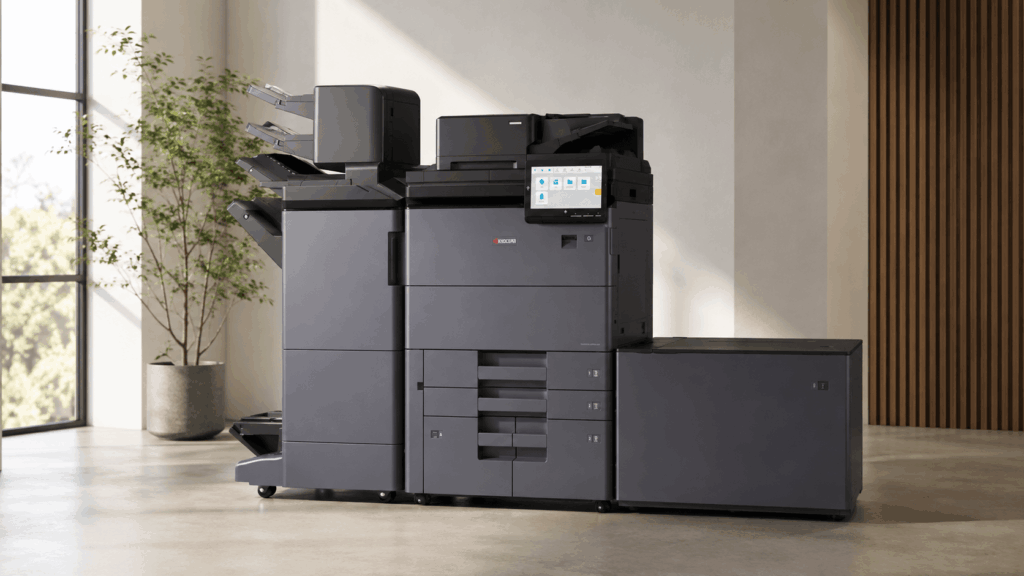
The Kyocera TASKalfa MZ10500i and MZ9500ci series is a seven-model range of high-volume A3 multifunction printers reaching India in 2026 — four monochrome models running 75 to 105 pages per minute, and three colour models running up to 95 ppm mono and 80 ppm colour. The headline changes are an industry-first dual toner container system, AI-assisted duplex scanning at 300 images per minute, and 2400 x 2400 dpi colour.
That’s the summary. Now the part the brochure won’t tell you.
We’ve been selling and servicing Kyocera across India for over 20 years, and every time a new high-volume series lands, the same thing happens: buyers look at the ppm number, pick the fastest model they can afford, and then discover eighteen months later that they bought 105 ppm for a 60,000-page-a-month workload. This post is written to stop that.
What Kyocera actually launched: all seven models
Kyocera calls this range the Nova series internally. It replaces the previous generation of high-end TASKalfa A3 devices and is built on one shared platform — same chassis, same 10.1-inch panel, same finishers, same 685 x 660 x 1,227 mm footprint across every model.
| Model | Type | Mono speed | Colour speed | Print resolution |
|---|---|---|---|---|
| TASKalfa MZ7500i | Mono | 75 ppm | — | 1200 x 1200 dpi |
| TASKalfa MZ8500i | Mono | 85 ppm | — | 1200 x 1200 dpi |
| TASKalfa MZ9500i | Mono | 95 ppm | — | 1200 x 1200 dpi |
| TASKalfa MZ10500i | Mono | 105 ppm | — | 1200 x 1200 dpi |
| TASKalfa MZ7500ci | Colour | 75 ppm | 70 ppm | 2400 x 2400 dpi |
| TASKalfa MZ8500ci | Colour | 85 ppm | 75 ppm | 2400 x 2400 dpi |
| TASKalfa MZ9500ci | Colour | 95 ppm | 80 ppm | 2400 x 2400 dpi |
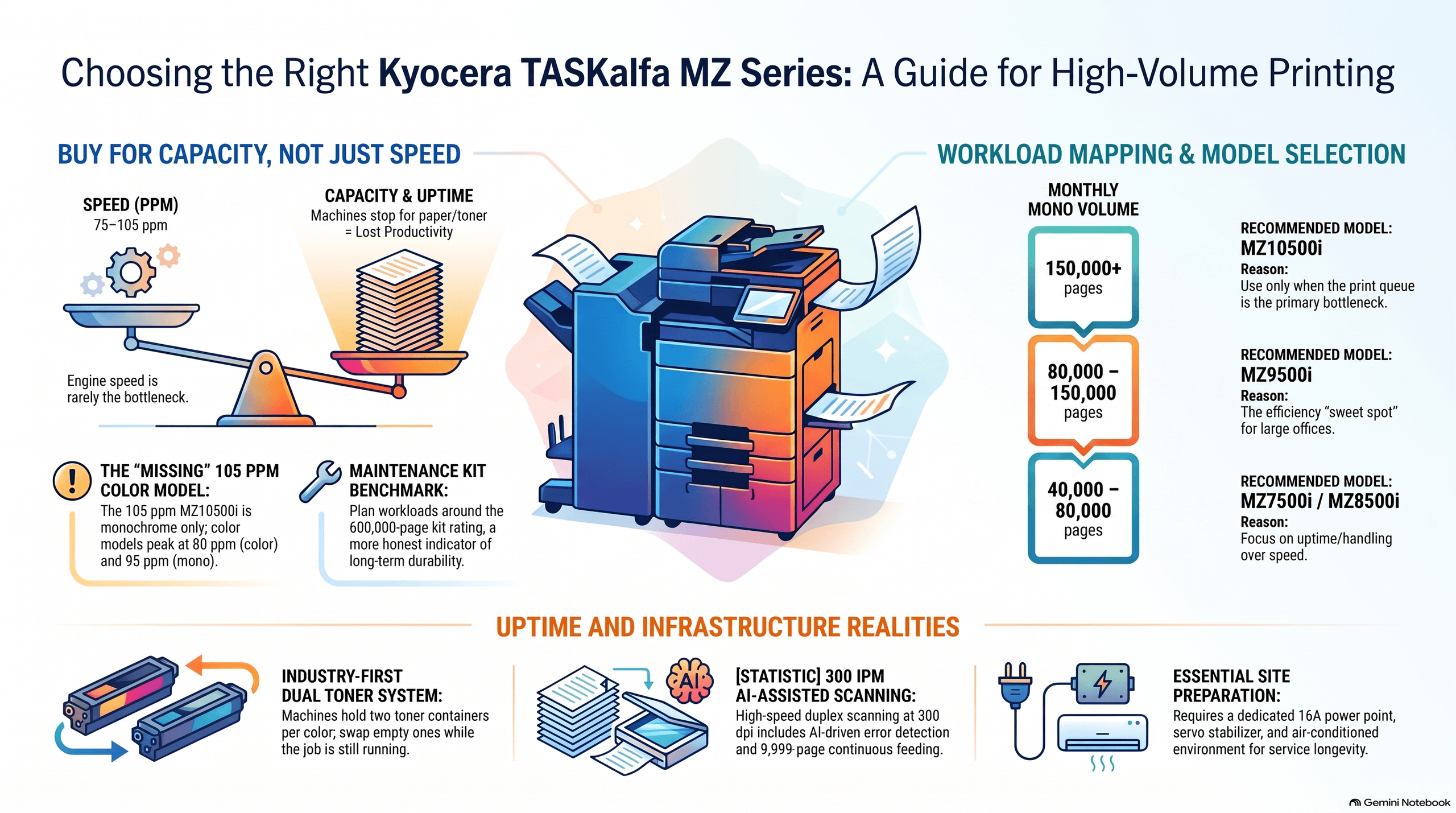
One point that trips up buyers immediately: there is no MZ10500ci. The 105 ppm model is monochrome only. If you need colour, the ceiling in this series is the MZ9500ci at 80 ppm colour. Anyone quoting you a “MZ10500ci” is quoting a machine that doesn’t exist.
The colour models ship with 9GB memory; the mono models get 7GB. Both lines use the same QorIQ LS1046A 1.6GHz processor and a 256GB SSD as standard, with a 1TB HDD available as an option.
Which model actually fits your monthly volume?
Kyocera hasn’t published a monthly duty cycle for this series in the Asia brochure, and I’d push back on any dealer who quotes one confidently without a written spec sheet from Kyocera India. Ask for it in writing before you sign.
What you can plan around is the maintenance kit interval, which is a far more honest indicator of designed workload. Both the mono kit (MK-6835) and the colour kits (MK-8835A and MK-8835B) are rated at 600,000 pages. Work backwards from that.
Here’s how I’d map real Indian workloads to models:
| Your monthly volume | Recommended model | Why |
|---|---|---|
| 40,000–80,000 mono pages | MZ7500i or MZ8500i | Speed is not your bottleneck; paper handling and uptime are |
| 80,000–150,000 mono pages | MZ9500i | The sweet spot for most CRDs and large offices |
| 150,000+ mono pages, deadline-driven | MZ10500i | Buy the 105 ppm only when the queue genuinely backs up |
| Mixed colour, under 30,000 colour pages | MZ7500ci | Don’t pay for 80 ppm colour you won’t use |
| Heavy colour, 30,000–70,000 colour pages | MZ8500ci or MZ9500ci | Colour consistency matters more than speed here |
The trap is buying speed instead of capacity. A machine running at 105 ppm and one running at 85 ppm both stop dead when the paper deck empties or the toner runs out. In the offices where I’ve seen these high-end machines underperform, it was almost never the engine speed — it was operators walking to the machine eleven times a shift.
The dual toner container system is the real upgrade
Kyocera calls this an industry first, and for once the marketing line matches what happens on the floor. Each colour position holds two toner containers. When one empties, the machine switches to the second and keeps printing. You swap the empty one while the job is still running.
Anyone who has run a 4,000-sheet booklet job knows why this matters. On the previous generation, toner-out mid-run meant a stopped job, a re-registered finisher, and an operator hunting for a spare cartridge in a store room. Kyocera also claims routine maintenance can be completed in two and a half minutes on this platform.
For Indian buyers this is worth more than it is in Europe, and the reason is boring: staffing. European CRDs run with a dedicated operator standing at the machine. Most Indian print rooms and back offices don’t. The machine runs unattended for stretches, and every stoppage costs you the print time plus the time until somebody notices.
Both the mono and colour lines share the same WT-8830 waste toner bottle. If you’re running a mixed fleet, that’s one less part number to stock.
Read the “300 ipm scanning” number correctly
The brochure headline says AI-enabled scanning up to 300 ipm. That figure is for duplex scanning at 300 dpi. Simplex is 150 ipm.
That’s not a criticism — the scanner is genuinely quick, and 300 ipm duplex on a 500-sheet document processor is strong. But if you’re scanning single-sided documents, which is most Indian back-office archival work, plan around 150 ipm and you won’t be disappointed.
The document processor handles continuous scanning up to 9,999 pages, and the straight-path design lets you feed thick media and ID cards without the sharp turn that causes jams. Two caveats from the brochure worth knowing before you order: the straight-path scanner cannot be used together with the Inserter or the Mailbox unit, and the image-defect prevention feature only works when reading from the document processor, not the platen.
Two features I actually like here. The confidential document guard detects registered watermarks and stamps and blocks copying or scanning of marked documents — useful for legal firms and finance departments handling tender documents. And the panel rotates 90 degrees so a portrait scan preview fills the screen instead of sitting in a letterbox. Small thing. Operators notice it every day.
Paper handling and finishing
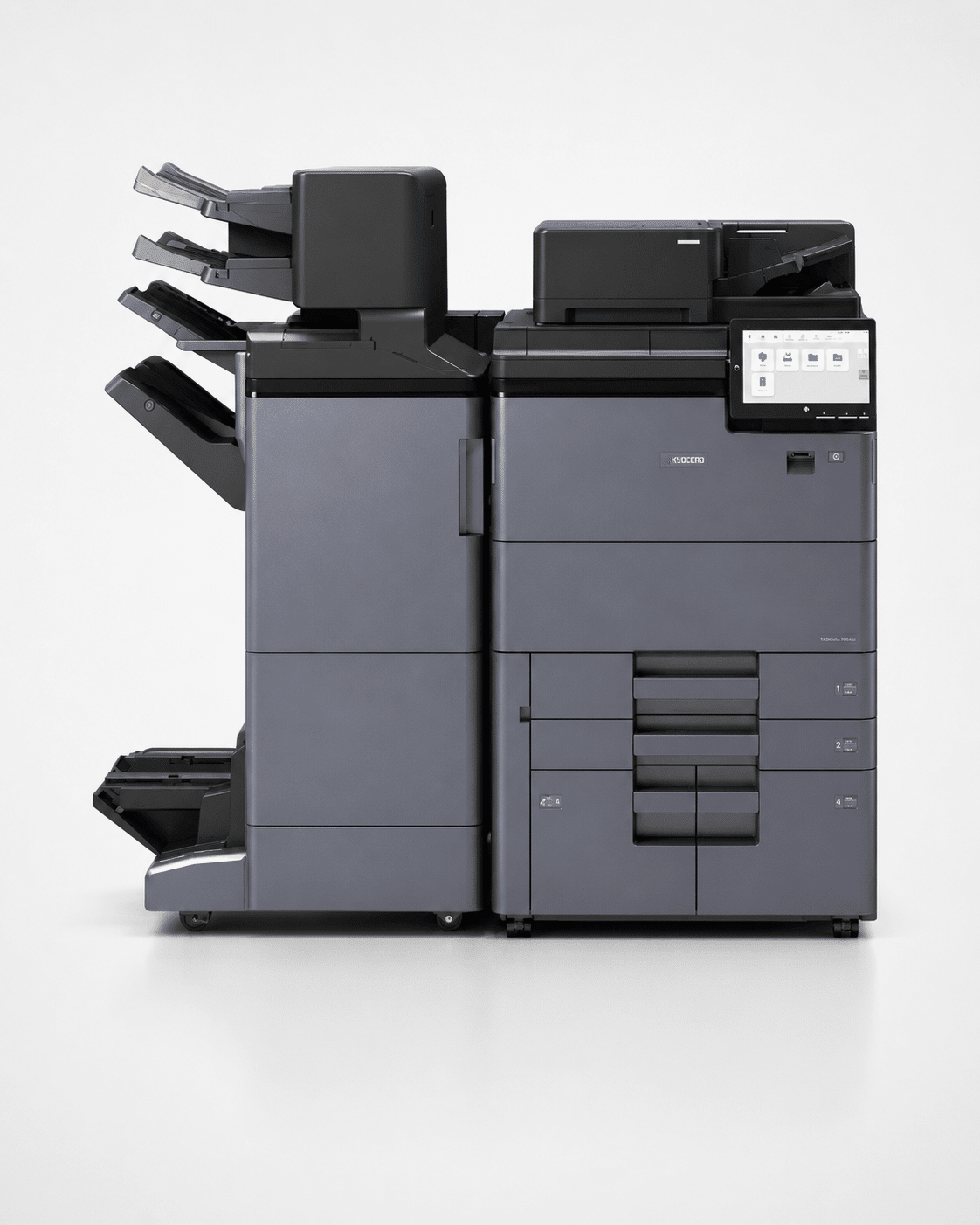
Standard paper capacity is 4,350 sheets: two 550-sheet cassettes, a 250-sheet multi-purpose tray, and two 1,500-sheet decks. Add the PF-7210 side deck and you reach 7,550 sheets maximum.
Choose your side deck carefully:
- PF-7200 — 3,000 sheets, A4 only
- PF-7210 — 3,200 sheets, handles up to 13 x 19.2 inch
If there is any chance you’ll run SRA3 or 13 x 19.2 inch work — covers, brochures, oversized reports — take the PF-7210. Retrofitting later costs more than specifying it correctly at purchase.
Media handling is genuinely wide: 52 to 300 g/m² from both the cassettes and the MPT, with banner printing up to 1,220 mm long at 136–163 g/m². Duplex is more restricted, at 52–256 g/m² for A5R–A4 and 60–256 g/m² for A3–SRA3. So you can print 300 gsm card, but only single-sided.
On finishing, the DF-7200 and DF-7210 both stack 4,250 sheets; the difference is stapling capacity — 65 sheets versus 100. Kyocera says the finisher takes 36% less floor space than the previous generation, which in a cramped Indian print room is a real consideration, not a spec-sheet line. You can add a booklet and tri-folding unit (BF-7200), a Z-fold unit (ZF-7200), a punch unit, and a 7-bin mailbox (MT-7200) for 700 sheets of sorted output.
One combination restriction to note at order stage: the IS-7200 inserter and MT-7200 mailbox cannot be fitted together. Pick one.
What it actually costs to run
This is where most buying decisions get made badly, so let’s do it properly.
An AMC, or Annual Maintenance Contract, is a fixed yearly fee covering servicing and parts. A CPC or cost-per-copy contract instead charges per page printed. On machines at this volume, the CPC economics are driven almost entirely by consumable yield — so start there.
Monochrome models use the TK-6830 toner, rated at 40,000 pages, with the MK-6835 maintenance kit at 600,000 pages.
Colour models use TK-8830C, TK-8830M and TK-8830Y at 24,000 pages each, plus TK-8830K black at 42,500 pages. Maintenance kits MK-8835A and MK-8835B are each rated at 600,000 pages.
Your mono cost per page works out to roughly:
(TK-6830 price ÷ 40,000) + (MK-6835 price ÷ 600,000) + paper + power
And for a full-colour page at ISO coverage:
(TK-8830C ÷ 24,000) + (TK-8830M ÷ 24,000) + (TK-8830Y ÷ 24,000) + (TK-8830K ÷ 42,500) + kit amortisation + paper + power
I’m deliberately not filling in rupee figures here, because toner MRP in India moves and because any number I publish today will be wrong by the time you read this. Ask your dealer for the current TK-6830 and TK-8830 landed price including GST and run the division yourself. If a dealer quotes you a cost per page but won’t show you the toner price and yield behind it, that’s your answer about the dealer.
Power costs are not trivial at this level. The mono models draw 1,300W to 1,530W in copy/print mode; the colour models draw 1,310W to 1,450W. Maximum draw is rated at 2,400W or less. Standby is 130W and energy-saver mode drops to 0.5W. At Indian commercial tariffs, a machine running eight hours a day at 1.5kW is a line item you should put in the proposal, not discover later.
The India realities the brochure doesn’t cover
Electrical. At 2,400W maximum, you’re pulling roughly 11 amps at 220V. Put this on a dedicated 16A point, not a shared board with the AC and the water cooler. I’ve seen more high-end MFP faults traced to dirty power and voltage dips than to any component defect. Budget for a proper servo stabiliser sized above the peak draw, and if your site has frequent cuts, size the UPS for a clean shutdown rather than for continued printing — these machines are not designed to run on battery.
Floor loading and access. The colour models weigh approximately 165 kg, mono approximately 152 kg, before you add a 4,250-sheet finisher and a 3,200-sheet side deck. Measure your lift, your doorways, and your ramp before you sign. A fully configured unit does not go up a narrow staircase, and I’ve watched more than one delivery turn around at the gate.
Heat. The brochure mentions a water-cooling system that prevents temperature spikes during continuous high-volume runs. Good design, but it doesn’t remove the heat from the room. Air-conditioned print rooms are not a luxury at this speed in an Indian summer — they’re a service-life decision.
Government and institutional buying. For GeM procurement, get the model listed with full specifications and the correct HSN classification before your tender window opens, and confirm whether the buying department needs the FIPS 140-3 communications security compliance called out in the technical bid. Kyocera has documented that in this series, which helps.
Spares. New platform, new part numbers. Ask your dealer directly what TK-6830 and TK-8830 stock they hold in India today and what their committed replenishment time is. For a machine at this volume, a two-week toner wait is not an inconvenience — it’s a shutdown.
Who should not buy this series
Honest advice, from someone who would rather sell you the right machine once than the wrong machine twice.
Don’t buy this if you print under 40,000 pages a month. A mid-range TASKalfa will do that work at a fraction of the capital cost, and you’ll never recover the difference in cost per page.
Don’t buy this if you’re doing commercial print for sale. This is a high-end office and CRD machine, not a production press. If you’re selling printed output as your product — wedding cards, commercial brochure runs, short-run book work — you want a genuine production device with a proper duty cycle rating, heavier registration control, and a service contract written for that world. Ask us about that separately.
Don’t buy the MZ10500i just because it’s the fastest. The gap between 95 ppm and 105 ppm is about 10% of engine time on a machine that spends far more of its day waiting for operators, jobs, and paper than it does printing at rated speed. Put that money into the PF-7210 deck and the better finisher instead. You’ll feel it more.
Don’t buy colour “just in case.” The colour models carry four toner lines instead of one, and the running cost difference is real. If your colour volume is genuinely occasional, buy mono and outsource the colour work.
How it compares to what you’re probably replacing
Most buyers looking at this series are running a previous-generation high-end TASKalfa that’s four to seven years old. The upgrade case rests on four things, in order of how much you’ll actually notice them:
- Dual toner containers — the single biggest uptime change on this platform
- Scanning throughput — 300 ipm duplex with error detection versus what your current DP manages
- Colour stability — condition-based calibration with built-in ICC profiles means fewer reprints on long colour runs
- Finisher footprint — 36% smaller, which matters if you’re adding capacity in the same room
If your current machine is holding its output quality and your service costs are stable, there is no urgency here. Machines in this class have long useful lives, and Kyocera‘s long-life component design is the whole reason people buy the brand. Upgrade when your downtime cost exceeds your capital cost, not when a new model launches.
What is the price of the Kyocera TASKalfa MZ10500i in India?
Kyocera hasn’t published open MRP for this series in India, and pricing at this level is always configuration-dependent — the finisher, side deck, Fiery controller and fax kit can change the total substantially. Contact CopierBazar for a current quote with GST for your specific configuration, anywhere in India.
What is the difference between the MZ9500ci and the MZ10500i?
The MZ9500ci is a colour A3 MFP running 95 ppm mono and 80 ppm colour at 2400 x 2400 dpi. The MZ10500i is monochrome only, running 105 ppm at 1200 x 1200 dpi. There is no colour version of the 105 ppm model.
How fast does the Kyocera TASKalfa MZ10500i scan?
The document processor scans up to 300 images per minute in duplex mode and 150 ipm in simplex, both at 300 dpi. It holds 500 sheets and supports continuous scanning up to 9,999 pages with straight-path feeding for thick media.
What toner does the Kyocera MZ series use?
Monochrome models use the TK-6830, rated at 40,000 pages. Colour models use TK-8830C, TK-8830M and TK-8830Y at 24,000 pages each, plus TK-8830K black at 42,500 pages. Both lines share the WT-8830 waste toner bottle.
Is the TASKalfa MZ9500ci a production printer?
It’s positioned between office MFPs and true production presses. It handles 13 x 19.2 inch media, 300 gsm stock, banner printing, and integrates with Fiery and the Kyocera Production Print Suite — but for commercial print-for-sale work, a dedicated production device is the better fit.
What paper sizes can it handle?
Cassettes take A6R up to SRA3 (320 x 450 mm) in the upper tray and up to 13 x 19.2 inch in the lower. The multi-purpose tray goes from A6R to 13 x 19.2 inch and supports banner printing up to 1,220 mm long.
Does it support Fiery?
Yes, on the colour models only, via the Printing System 18 controller and the Printing System Interface Kit 18. Kyocera Production Print Suite modules — Variable Designer, Colour Management and Dashboard — are also available, with Colour Management restricted to colour machines.
Can I add booklet making and folding?
Yes. The BF-7200 booklet and tri-folding unit and the ZF-7200 Z-fold unit both attach to the DF-7200 and DF-7210 finishers. Note that the IS-7200 inserter and MT-7200 mailbox cannot be installed together on the same device.
The bottom line: if you’re running 80,000+ pages a month and your current machine is costing you in stoppages rather than in service bills, the MZ9500i and MZ9500ci are the two models in this series I’d shortlist first. The MZ10500i earns its place only when the print queue is genuinely your bottleneck.
As authorised Kyocera dealers, CopierBazar supplies, installs and services the full TASKalfa range across India, including AMC and CMC contracts and GeM procurement support. WhatsApp or call us with your monthly volume and we’ll tell you which model you actually need — including when the answer is a cheaper one.